eBay item specifics: what they are and why listings get refused
By the SaleLinx team ·
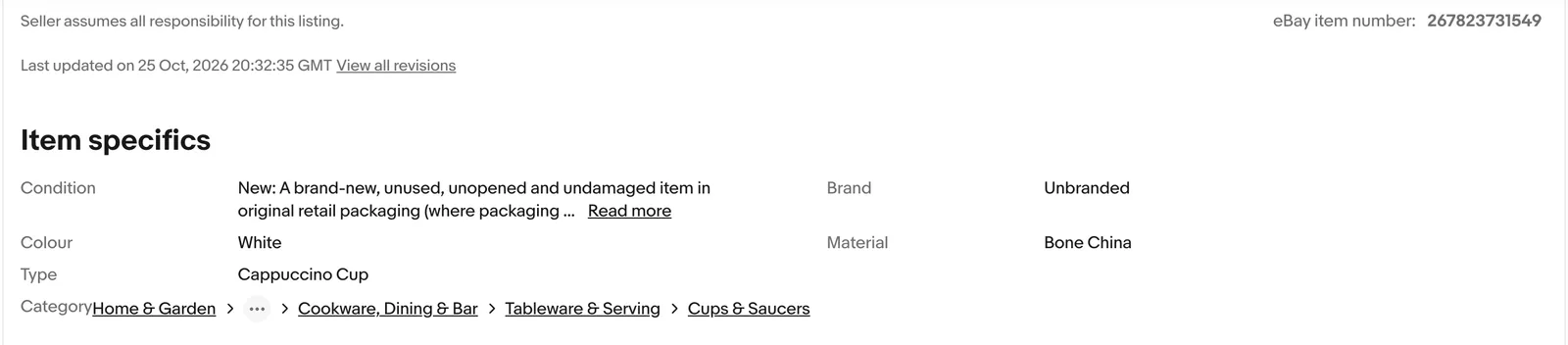
Item specifics are the structured fields on an eBay listing: brand, size, colour, department, type, material and so on. They are separate from the title and the description, and they are the only part of a listing that eBay’s search filters can read. When eBay says a listing is missing required item specifics, it means one of those fields is empty or holds a value eBay does not recognise, and it will not let the listing go live until you fill it in.
A listing is refused when a required specific is empty or has a made-up value. For clothing in the UK that is almost always Brand, Size, Colour, Department or Type. The sell form marks every required field, so fill those first, pick eBay’s suggested value rather than typing your own, and check Seller Hub’s missing specifics filter for the listings you already have up.
What item specifics are
eBay’s Seller Centre describes them as fields that “may include brand, size, type, colour, style or other relevant info about the item you’re selling”. Each one is a name and a value: Brand is the name, Nike is the value. The names depend on the category you list in. A pair of trainers gets UK Shoe Size and Upper Material; a dress gets Dress Length and Sleeve Length.
They matter because eBay does not read your description the way a buyer does. Its filters, its category pages and a lot of its search ranking work from these fields. Write “size 12 black Zara dress” in the title and leave the Size field empty, and a buyer who ticks Size 12 in the filter panel will never see it.
Required, recommended and additional
eBay sorts the specifics for every category into three groups, and the difference decides whether your listing goes live.
- Required. The Seller Centre says “New or revised listings that don’t include required item specifics will be blocked.” These are the ones with a mark next to them in the sell form. Brand, Size and Colour are the examples eBay itself gives as “critical to the buyer experience”.
- Recommended. Not needed to list, but eBay says they “improve your potential buyers’ search experience”. They feed the filters and the category pages, so a listing without them is live but easy to miss.
- Additional. Everything else eBay offers for the category. Useful when a buyer is picky, otherwise optional.
There is a fourth label you will see from time to time: Required soon. eBay adds new required specifics a few times a year and flags them in the sell form with the date they become mandatory. Its April 2022 notice is a typical example: new fields appeared in May and became required in July. A listing that was fine when you wrote it can need a new field the next time you revise it.
Why eBay refuses a listing
eBay blocks a listing at the point you save it, and the message is nearly always one of these four.
- A required specific is empty. The most common one by far. The sell form highlights the field and will not let you continue.
- The value is not one eBay recognises. You can type a custom value in many fields, but for some, Size being the big one, eBay now only accepts its own list. Its listing help says that from August 2026 apparel and footwear listings with “unclear or missing size or condition details may be hidden until updated”, and names “See description” and “N/A” as the kind of value it will flag.
- The category is wrong. Each category has its own set of specifics. List a women’s coat under Men’s Coats and eBay asks for a different Size list and a different Department, and your values stop matching.
- A placeholder in a required identifier. eBay’s item description policy says that “Does not apply”, unbranded or generic, and “N/A” are not allowed in required product identifiers such as EAN or MPN. Second-hand clothes rarely need those, but a listing can still be refused for it if you pick a category that does.
The same policy says the consequences of ignoring it run from “removing the listing” through warnings to “restricting activity or account suspension”. In practice an empty field just stops the listing. A wrong or misleading value on a live listing is what leads to removal.
What is required for clothes, shoes and accessories
The exact set depends on the leaf category, and eBay changes it. The sell form is the only complete list, and it is the one to trust. The table below is what sellers listing in eBay UK’s Clothes, Shoes and Accessories tree meet most often.
| Category | Usually required | Usual reason for a refusal |
|---|---|---|
| Tops, jumpers, hoodies | Brand, Size, Colour, Department, Type | Size left blank, or typed as "Small" instead of S |
| Dresses and skirts | Brand, Size, Colour, Department, Type, Style | Style empty; Dress Length or Skirt Length missing |
| Jeans and trousers | Brand, Size, Colour, Department, Type, Inside Leg or Size Type | A waist written as "32 34" that eBay cannot read |
| Coats and jackets | Brand, Size, Colour, Department, Type, Style, Outer Shell Material | Material or Style left empty |
| Shoes and trainers | Brand, UK Shoe Size, Colour, Department, Type, Upper Material | An EU size in the UK size field |
| Bags and accessories | Brand, Colour, Type, Department | A brand that is not on eBay's list, or Type empty |
Two of these catch sellers out again and again. Department is not the same as the category: eBay wants Men, Women, Unisex Adult, Boys or Girls as a field, even if the category already says Women’s. Size Type (Regular, Petite, Tall, Plus, Maternity) sits next to Size on many clothing categories and is easy to scroll past.
How to see the required list before you list
You do not have to guess.
- In the sell form. Pick the category first, then scroll to Item specifics. The required fields sit at the top with a mark, and the dropdown values under each one are eBay’s own list. The Seller Centre advises you to “use eBay’s suggested values as much as possible rather than creating your own custom values”, because a custom value does not match a filter.
- In Seller Hub, for listings already up. The Active listings page has quick filters for listings missing Required, Required soon and Recommended specifics, and the Overview tab shows a task reminder when any listing is missing a required one. The Download button on the same page offers an Excel file of your listings with their specifics, which you can fill in and upload back.
- In the app. My eBay and the eBay app show which of your active listings have missing item specifics, according to the Seller Centre.
What to put when you genuinely do not know
Most refusals come from fields that are hard to fill honestly on second-hand stock: no label, a faded size, a brand you cannot read. Here is what works and what does not.
- Brand. If there is no brand, eBay’s own list includes Unbranded and Handmade. Pick the one that is true. Do not type the shop you bought it from, and do not put a designer name on an item that only looks like one.
- Size. Use the closest supported size. The item description policy says “If an exact size is not available, select the closest supported size option”, and that sellers “must select the size that most accurately matches the manufacturer’s size designation”. Put the measurements in the description, not the Size field. “See description” in the Size field is exactly what eBay has said it will hide from August 2026.
- Colour. Pick the dominant colour from the list. Multicoloured is a valid value for prints.
- Material. Read the care label. If there is none, choose the closest from the list, or leave a recommended field empty rather than guess. Only a required field blocks the listing.
- Product identifiers. EAN, UPC and MPN are rarely required for clothes. When they are, the policy bans “Does not apply” and “N/A”. If the item really has no code, check whether you are in the right category; a used-clothing category normally does not ask.
A specific must be true. The policy also bans “Including terms in the wrong field” and “Including information that is not specific to that field”, so a Colour of “Black Nike Hoodie M” is a policy breach, not a keyword trick.
How specifics drive search and filters
Buyers on eBay rarely scroll past the first page. They search, then narrow with the panel on the left or the filter sheet on mobile: Size, Brand, Colour, Condition, Price. Every one of those filters reads a specific, not the title. The Seller Centre puts it plainly: filling them in “will help to increase your product’s visibility, especially when buyers use the left-hand navigation filters”, and some specifics “can even make your listings more likely to appear in Google Shopping results”.
The same page says eBay ranks which specifics to show you by “buyer demand data which is compiled from searches on the site over the past 30 days”. In other words, the fields near the top of the sell form are the ones buyers are filtering on right now, so they are the ones worth filling even when they are only recommended.
Fixing the listings you already have
If you have been selling for a while, some of your live listings are missing fields that have since become required. They stay live, because the block only applies to new and revised listings, but every one of them is invisible to the filters, and the next time you edit one eBay will stop you until you fill it in.
In Seller Hub. Go to Listings, then Active, and use the “Item specifics: required” quick filter. Select the listings and click Edit to add specifics to several at once, or use Download, pick the missing specifics file, fill in the spreadsheet and upload it. The spreadsheet route is the quicker one above about 50 listings.
Whichever route you take, fix Size and Condition first on clothing and footwear. Those are the two eBay has said it may hide listings for.
Crosslisting from Vinted or Depop
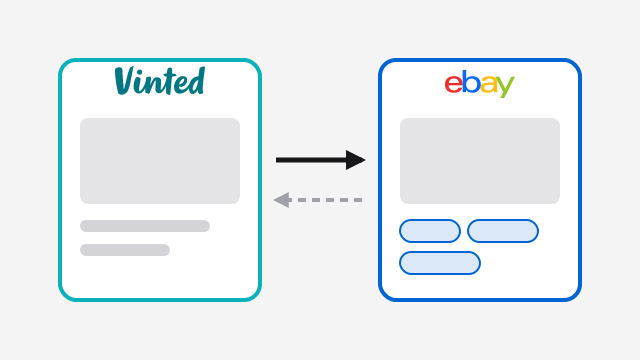
Vinted and Depop have far fewer structured fields than eBay. Vinted has a brand, a size, a condition and up to two colours. Depop has a brand, a size, a condition and a colour. Neither has Department, Type, Style, Size Type or Material. So when you copy a listing across, the eBay form has gaps that the source listing cannot fill, and eBay refuses the copy.
Any crosslisting app has to deal with this in one of three ways: post what it has and let eBay reject it, ask you for every missing field before it posts, or work the missing ones out from the title and category and ask only for what is left. Our comparison of crosslisting apps covers how each one handles it.
If you crosslist by hand, do the eBay listing from the sell form with the Vinted tab open beside it, and fill the required block before you touch the description. The description is the part you can copy and paste; the specifics are the part you cannot.
How SaleLinx helps
SaleLinx is a Chrome extension for Depop, Vinted and eBay sellers. Its Vinted to eBay and Depop to eBay crosslisters take the third route above: they pick the eBay category, fill in brand, colour, size, department and the rest from the source listing, check each item with eBay before anything is posted, and show a Fill in button on any row eBay would still refuse. Copies to eBay go live, so that check is the review step. For listings already on eBay, My Listings shows them next to your Depop and Vinted stock; select the eBay ones and click Edit, and each card has the category, condition and item specifics, with Save Changes sending them straight to eBay. The eBay bulk editor changes price, title, description and quantity across a selection; specifics are set per card. On eBay SaleLinx does crosslisting, My Listings and bulk edit, nothing else yet. From £7.99 a month, with a 14-day free trial.
Questions
What does “missing required item specifics” mean on eBay?
One or more fields that eBay requires for that category is empty, or holds a value eBay does not accept. The listing will not be saved until you fill it in. In the sell form the field is highlighted; in Seller Hub the listing appears under the Required quick filter.
Which item specifics are required for clothing on eBay UK?
It varies by category, but Brand, Size, Colour, Department and Type are the usual set, with Style, Material and a size measurement added in some categories. Pick the category in the sell form and look at the marked fields; that list is the current one.
Can I put “Does not apply” in an item specific?
Not in a required product identifier. eBay’s item description policy bans “Does not apply”, “N/A” and unbranded or generic in those fields. For Brand, pick Unbranded from eBay’s list if the item has no brand. For Size, pick the closest supported size and put the measurements in the description.
Do item specifics affect how many people see my listing?
Yes. eBay’s search filters, its category pages and part of its ranking read the specifics rather than the title. A listing with empty specifics is live but drops out of every filtered search, and eBay says complete specifics can also help listings appear in Google Shopping.
Will my old listings be removed if they are missing specifics?
Not for an empty field. The block applies to new and revised listings, so old ones stay live until you edit them. The exception is clothing and footwear with an unclear or missing size or condition, which eBay has said it may hide from August 2026 until updated. Fix those first.
How do I add item specifics to lots of listings at once?
In Seller Hub, filter Active listings by missing required specifics, select them and use Edit, or download the missing specifics spreadsheet, fill it in and upload it. Our eBay fees guide covers what each of those listings costs you once it sells.