How to send offers on eBay, Vinted and Depop
By Lewis Ludlam · · Facts checked
We make SaleLinx, the crosslisting extension, so read our product mentions with that in mind.

All three marketplaces let a seller send a private discount to someone who has shown interest in an item: a watcher or basket on eBay, a favourite on Vinted, a like on Depop.
- Send within a day of the like or watch, in the evening, at 10% to 15% off.
- Work out your floor first (cost, plus postage and packaging, plus the least profit you will accept) and never offer below it.
- eBay: at least 5% off, and the buyer gets 96 hours.
- Vinted: up to 40% off, with no limit on seller offers.
- Depop: to likers, one live offer per buyer.
- One offer per person per item, then leave them alone.
Who can you send an offer to?
Each marketplace limits offers to people who have already done something with the item. You cannot message a stranger with a discount.
- eBay: buyers who are watching the item, or who have had it in their basket for at least 2 days. eBay’s Best Offer and offers help page says an offer goes to the 30 most recent of those buyers. You can also send a custom offer to one buyer from a message thread.
- Vinted: anyone you are in a conversation with. Vinted’s page on favourites says that when a member favourites your item you can open a conversation and offer a discount with the Make an offer button. Only that member sees the lower price.
- Depop: people who have liked the item. Depop’s Send Offer help page says you can send to one liker or all of them, only to buyers in your own country, and only one active offer per buyer.
The rules compared
- eBay
- Watchers, and baskets after 2 days (30 most recent)
- Vinted
- Anyone in a conversation with you, including people who favourited the item
- Depop
- Likers, in your country
- eBay
- 5% below Buy It Now
- Vinted
- None stated
- Depop
- None stated
- eBay
- None stated
- Vinted
- 40% off the listed price
- Depop
- None stated
- eBay
- 96 hours, or until the item sells
- Vinted
- Not published
- Depop
- 14 days, per the help centre
- eBay
- Up to 3 custom offers per buyer per listing
- Vinted
- No limit on seller offers
- Depop
- One active offer per buyer; send another once it expires
- eBay
- Up to 3 per item in most categories, seller has 24 hours to answer
- Vinted
- Up to 25 a day, up to 40% off
- Depop
- Make Offer, seller can accept, decline or counter
- eBay
- Seller Hub, Active listings, Send offers eligible filter
- Vinted
- The conversation screen, Make an offer
- Depop
- The listing, Likes, Send offer
- eBay
- None beyond normal selling fees
- Vinted
- None
- Depop
- None
| eBay | Vinted | Depop | |
|---|---|---|---|
| Who can get one | Watchers, and baskets after 2 days (30 most recent) | Anyone in a conversation with you, including people who favourited the item | Likers, in your country |
| Minimum discount | 5% below Buy It Now | None stated | None stated |
| Maximum discount | None stated | 40% off the listed price | None stated |
| How long it lasts | 96 hours, or until the item sells | Not published | 14 days, per the help centre |
| Offers per buyer | Up to 3 custom offers per buyer per listing | No limit on seller offers | One active offer per buyer; send another once it expires |
| Buyer offers the other way | Up to 3 per item in most categories, seller has 24 hours to answer | Up to 25 a day, up to 40% off | Make Offer, seller can accept, decline or counter |
| Where to find it | Seller Hub, Active listings, Send offers eligible filter | The conversation screen, Make an offer | The listing, Likes, Send offer |
| Extra fee | None beyond normal selling fees | None | None |
How to send an offer on eBay
eBay calls this Offers to buyers. It is only available on fixed-price listings, and you need an eligible buyer before the button appears.
- Open Seller Hub and go to the Active listings page.
- Pick the Send offers eligible filter. Listings with a watcher, or an item that has sat in a basket for 2 days, show up here.
- Select one listing and choose Send offer, or select several and choose Send offers to do them in bulk.
- Enter the price. It must be at least 5% below the Buy It Now price. You can add a message, and untick the box that allows counteroffers if you want a yes or no.
- Send. The offer goes to the 30 most recent interested buyers, and each has 96 hours to accept before it lapses.
Two extras:
- Automatic repeat: on your first offer, eBay offers to send the same offer to future interested buyers on that listing, so you do not have to come back every few days.
- Custom offers: from a message thread with one buyer, Send offer lets you send up to 3 custom offers on a listing, each valid for 96 hours.
eBay’s Seller Centre says there is no extra fee beyond the usual selling fees. If you sell privately in the UK, our eBay fees guide covers what those are now.
Best Offer, the other direction
Turning on Best Offer lets buyers open the negotiation. They can make up to 3 offers per item in most categories, and you have 24 hours to accept, decline or counter. You and the buyer can each send up to 3 counteroffers, each valid for 96 hours.
Set auto-accept and auto-decline limits. A lower limit turns down lowballs for you, and an upper limit sends good offers straight to payment.
How to send an offer on Vinted
Vinted has no offers screen. A seller offer is a message in a conversation, and you can only reach people already in your inbox or who have favourited the item.
- Open the item and look at who has favourited it, or open an existing conversation.
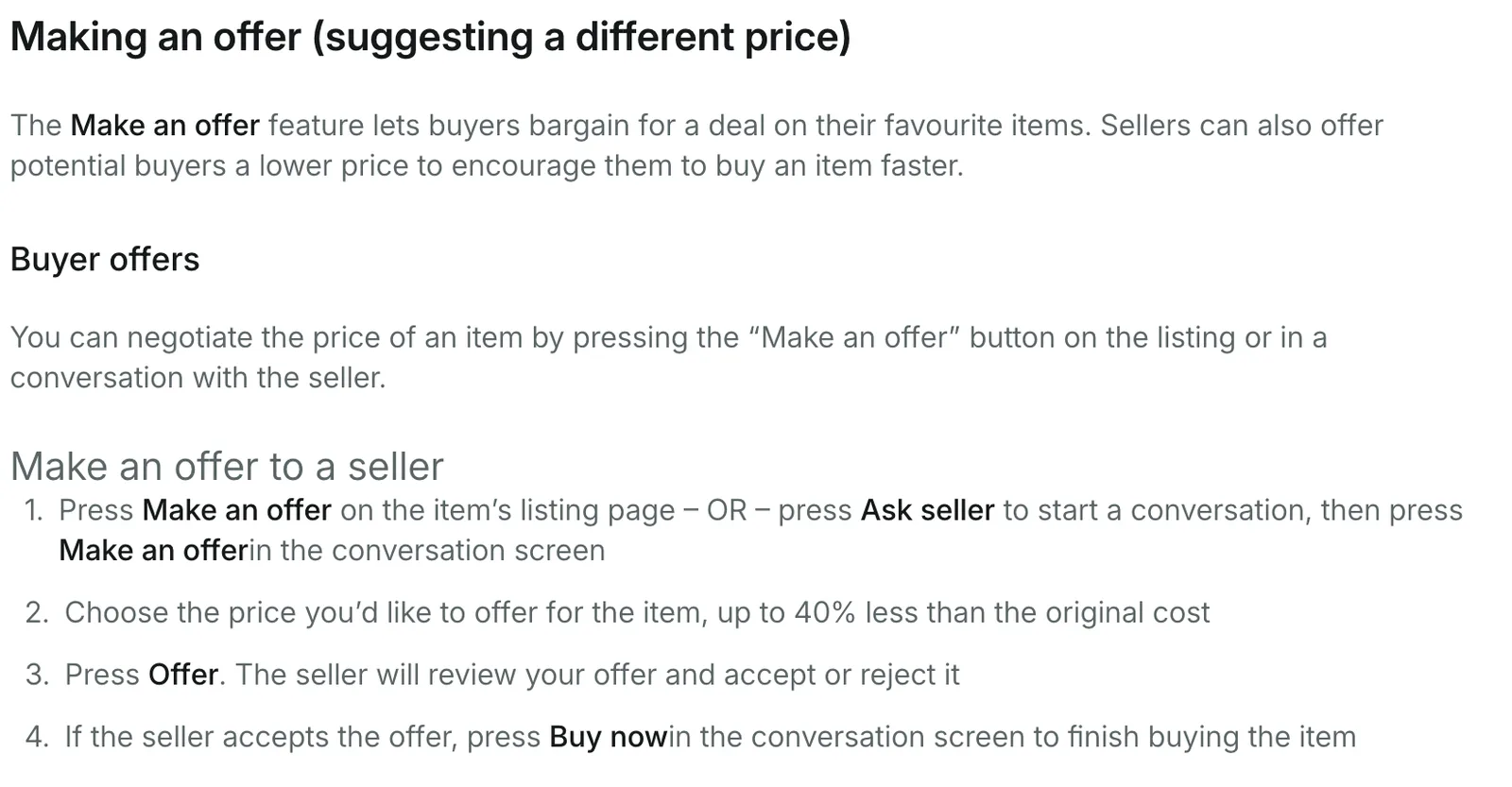
- Press Make an offer in the conversation screen.
- Choose the new price. Vinted’s making an offer page says it can be up to 40% below the listed price, with no limit on the number of offers a seller makes.
- Send. The buyer sees the lower price, nobody else does.
Vinted says offers are not binding. The buyer is not obliged to buy, the item stays on sale to everyone else at full price, and the sale only happens when the buyer presses Buy now. Vinted does not publish how long an offer stays open.
Buyers can also send you offers, up to 25 a day across the site and again up to 40% off. You can accept, decline, or decline and counter with the same Make an offer button.
Vinted’s terms restrict external software tools and unsolicited mass messages. Send offers one conversation at a time, to people who have shown interest, and keep the message short.
How to send an offer on Depop
Depop built a dedicated Send Offer tool in 2023 and said in January 2024 that buyers using offers had been getting a 23% average discount.
- Open your listing and tap the likes count, or open the like in your notifications.
- Tap Send offer. You can send to one liker or to everyone who liked the item.
- Enter the discounted price and send.
Depop’s help centre says you can only have one active offer per buyer on an item, and that once an offer expires you can send a new one. It also says offers last 14 days, after which the item goes back to its original price for that buyer.
Depop’s own 2024 announcement described a 24-hour window, so look at the expiry shown on the Send offer screen rather than trusting either number.
Buyers can make their own offer with the Make Offer button next to Buy, and you can accept, decline or counter from the conversation.
How much should you knock off?
Start from your floor, not from the list price. The floor is the lowest price that still pays you: what the item cost, plus postage and packaging if you cover them, plus the least profit that makes the sale worth your time. Everything above it is room to negotiate.
Worked example: you list a jumper at £20. It cost £5, postage and packaging if you offer free postage come to £4, and you want at least £4 for the effort. Your floor is £13.
- 10% off, £18: barely noticed by the buyer, but a first move that leaves room to counter. Good for an item getting likes daily.
- 15% off, £17: the sweet spot for most second-hand clothing. The buyer sees a real saving and you keep £8 over costs.
- 25% to 30% off, £14 to £15: for stock that has sat for a month or more, or to clear it before a season ends. Our guide to relisting on Vinted explains why this beats deleting and re-uploading an item that has likes.
- Below the floor: never. If the only way to shift an item is below £13, it was priced or bought wrong, and that is a different problem.
The buyer pays a fee on top of your price on all three marketplaces, so a £17 offer costs them more than £17. A 10% drop in your price is a smaller percentage drop in what they pay, but it still turns a maybe into a yes.
When should you send?
- Soon after the like: an offer within the same day lands while the buyer still remembers the item. On eBay, a basket needs 2 days before it counts.
- In the evening: most people are browsing then, which is also when our guide to the best time to post on Vinted suggests listing. An offer sent at 8pm gets opened, and one sent at 10am sits under the day’s notifications.
- Before the window closes: eBay gives 96 hours. If it expires, wait a few days before sending another so it does not read as pestering.
- Before a price drop: if you plan to lower the price for everyone, send likers an offer first. They get the discount and you keep the public price.
What not to do
- Repeat offers to the same person: eBay caps custom offers at 3. Vinted does not, but its terms ban mass messaging, and a second unanswered offer rarely changes a no.
- Offer more than you need to: start at 10% to 15%. You can always go lower later, but not back up.
- Forget the offer is private: on Vinted and Depop the lower price is only shown to that buyer, and your listing stays at full price.
- Use tools on Vinted without reading the terms: Vinted restricts external software tools. Whatever you use, send offers one at a time to people who have shown interest.
 How SaleLinx helps
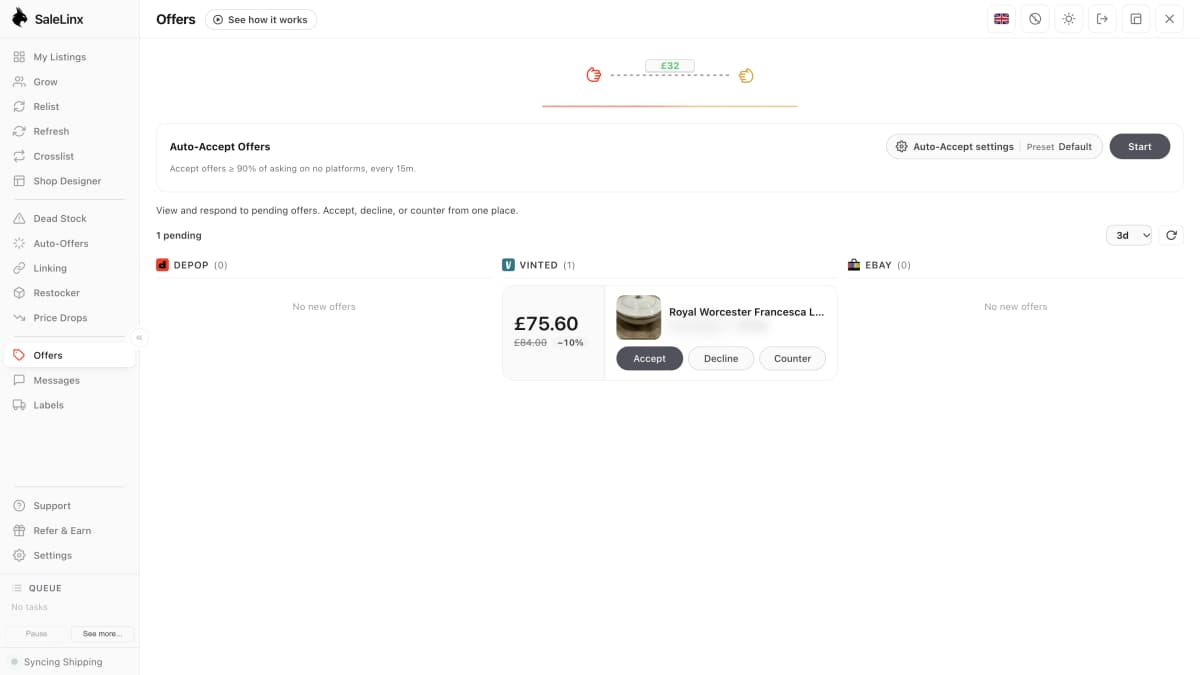
SaleLinx is a Chrome extension for Depop, Vinted and eBay sellers. It handles offers coming in on all three, and going out on Vinted.
- Offers tab: collects pending Depop, Vinted and eBay offers in one inbox, showing the item, the asking price and the buyer’s discount, with Accept, Decline and Counter on each card.
- Auto-Accept Offers: says yes for you to any offer above a percentage and a floor you set.
- Auto-Offers tab: finds the people who liked your Vinted items and sends each a discounted offer, one per liker per item, never below your floor.
It does not send offers to eBay watchers, so for that use the Seller Hub steps above. Vinted’s terms restrict external software tools, so keep Vinted activity to what a person would do by hand. From £7.99 a month, with a 14-day free trial.
Try it free for 14 daysQuestions
Can I send an offer to watchers on eBay?
Yes. Watchers and buyers with the item in their basket for 2 days are the two groups eBay lets you offer to. Use the Send offers eligible filter on the Active listings page in Seller Hub. The discount must be at least 5% and the offer lasts 96 hours.
How do I offer a discount to someone who liked my Vinted item?
Open a conversation with them and press Make an offer. You can go up to 40% below the listed price, and only they see the new price. The offer is not binding on either side, and the sale happens when they press Buy now.
How often can I send offers on Depop?
One active offer per buyer per item. Once it expires, Depop’s help centre says you can send another. Check the expiry shown when you send.
Does sending an offer cost anything?
No. eBay says there is no fee beyond the normal selling fees, and Vinted and Depop charge sellers nothing for offers. The buyer pays the usual buyer-side fee at checkout on top of your offer price.
What discount should I offer?
10% to 15% off for an item that is still getting likes, 25% to 30% off for stock that has sat for a month, and never below your floor of cost plus postage plus the minimum profit you will accept.