How to get more sales on Depop: a practical guide for UK sellers
By Lewis Ludlam · · Facts checked
We make SaleLinx, the crosslisting extension, so read our product mentions with that in mind.

To get more Depop sales, make each listing easy for a buyer to find and easy to say yes to. Nobody can promise a sale, and neither does Depop.
- Start with the listing. Depop names three things that matter most: price it well, write a clear and accurate description with measurements and signs of wear, and add photos from every angle.
- Use quick replies to offers and bundle deals to close sales.
- Treat boosting as a paid extra, not a fix. It costs 12% when it works.
Where Depop has said how something works, the point links to its own help page, checked on 6 November 2026. Where it has not, the advice is general guidance from how marketplaces tend to work, and it is labelled that way.
How does Depop search work?
Depop publishes how its search ranks listings. On its ranking page, when a buyer sorts by relevance the algorithm weighs:
- how well the listing matches the search terms, using the description, brand, category, colour and more
- how popular it is so far, meaning views, likes and adds to bag
- the seller’s location, mainly the buyer’s own country
- the buyer’s shopping habits
- when the item was listed, where “newer items get a slight edge, but this counts for much less than factors like relevance”
- information about the seller, such as items sold and views
- whether the item is boosted
- whether the listing and seller follow Depop’s policies
Relevance carries the most weight, so what you write matters more than when you post. A Top Seller badge or verified status, Depop says, “has no impact on where their listings rank in search results”. It also offers no higher ranking for payment other than Boosted Listings.
Photos
Depop’s selling guide says to use photos that accurately represent the item, include photos of any faults, and show labels and tags. Its page on stock images says photos must be your own, and a listing is removed if you use a stock image.
Show the item “from every angle” and highlight flaws. Depop’s ranking tips page lists this as one of its three biggest levers.
The listing guide says you can add up to four photos and one video in the app, or up to eight photos on the website. Depop publishes no rule for what the first image must look like. On the website you can pick and crop a cover image. These are general habits, not Depop rules:
- Lead with a clear shot of the whole item, in good daylight, on a plain background or worn.
- Use the other slots for the label, a close-up of fabric or print, and any flaw.
- Check the cover crop before you post. It is the one buyers see in a grid.
- Keep photos consistent across your shop so it looks like one seller.
Titles and descriptions
Depop’s description tips are specific, so follow them in order:
- Start with a title using words you would search for as a buyer.
- Add measurements and fit notes, because sizes vary between brands.
- Describe the condition, including flaws and signs of wear.
- Add shipping info and any bundle options.
- Keep it short, with only relevant words, hashtags and brands. The form allows up to five hashtags.
Fill in every field you can: category and subcategory, brand, colour (up to two), style and quantity. Depop says the more complete a listing is, the better it can match buyer searches. A buyer filtering by colour or condition only sees listings whose details match.
Adding information unrelated to the item, such as a brand you are not selling, “can hurt your listing’s exposure”. So no tag-stuffing.
Pricing and offers
Depop shows a suggested price range and similar sold items when you list. Its pricing page says some listings show three strategies: Likely to sell (the lowest), Balanced, and Less likely (the highest, which may take longer to sell). The suggestions are a guide only, with no guarantee of a sale.
For a repeatable method, see our guide to pricing second-hand clothes. Check what similar items sold for, list with a little room above your floor, and know the lowest price you would accept.
Remember the fees. Depop charges UK sellers 2.9% plus £0.30 payment processing, per its seller fees page, and that comes off before boosting if you use it.
Offers
Offers are the main way Depop sales close.
- The Send offer page says you can send an offer to one or all of the people who liked an item. The buyer then has 14 days to buy at that price.
- The Make offer page says a seller has 14 days to accept, decline or counter an offer a buyer sent.
Our offers guide covers all three marketplaces. Two Depop tools help:
- Auto-respond to offers: set a lowest price per listing. Offers at or above it are accepted, and lower ones get a counteroffer at that price. Depop says replies go out within 60 seconds.
- Discounts: mark items down from 5% to 95%. Buyers see the old price next to the new one, with a tag on the photo.
Does refreshing listings work?
You will see advice online to delete and repost, or keep “refreshing” listings, so they move up. Depop’s help centre has no page on refreshing or reordering listings as of 6 November 2026.
Its ranking page says listing date gives newer items a slight edge that “counts for much less” than relevance, and that popularity is judged on the views, likes and adds to bag an item has “so far”. So there is no documented way refreshing helps, and none that it hurts.
As general guidance:
- Spend your time on what Depop documents: photos, title, description and price.
- If a listing has sat with no views, changing one of those is a better reason to edit it than the date.
- Think twice before deleting a listing with likes you could use for a Send offer.
- Never repost an item you have already sold, and only use methods Depop allows. Check its Terms of Service if unsure.
Are boosted listings worth it?
Boosting is Depop’s paid advertising. Its Boosted Listings page says a boosted listing appears as both a tagged boosted listing and an organic listing, in search and Suggested for you. You can boost single listings or the whole shop, in which case new listings are boosted automatically.
The fee is 12% in the UK. How it works:
- It is charged on the item price excluding taxes, plus shipping if you arranged your own.
- It applies only if a buyer saw the boosted version and bought within 28 days. Under the Boosted Listings Policy, seeing it counts, and the buyer does not need to click.
- If you stop boosting, the fee still applies to a sale that follows a view while it was boosted.
- It sits on top of payment processing. If the sale is refunded, Depop says the boosting fee is reversed too (see the fees page).
- Boosting is open once you have activated your Depop Balance, or 28 days after account creation, whichever is sooner. The 12% rate applies to new listings from 23 March 2026.
- Not boosted
- £0.88
- Boosted sale
- £0.88
- Not boosted
- None
- Boosted sale
- £2.40
- Not boosted
- £19.12
- Boosted sale
- £16.72
| Not boosted | Boosted sale | |
|---|---|---|
| Payment processing (2.9% + £0.30) | £0.88 | £0.88 |
| Boosting fee (12%) | None | £2.40 |
| You keep | £19.12 | £16.72 |
Boosting suits a well-priced, well-photographed item that is not getting views. It does not repair a weak listing. Work out whether the item still makes sense at that margin first. Our Depop fees guide covers every Depop fee in one place.
Shop presentation
Depop publishes no rules for how a shop must look, so this part is general. Buyers who like one item will look at the rest of your shop.
- A consistent photo style.
- A short bio that says what you sell, your bundle deal and your usual postage time. Depop says you can highlight a bundle offer in your bio or item descriptions.
- Ship as soon as you can. The selling guide says it increases your chances of a 5-star review.
- Going away? Switch on Vacation Mode, which pauses purchases for 7 days, rather than leaving orders you cannot ship.
Top Seller needs 3 consecutive months of £1,000 sales, 50 new listings a month, a 4.5 rating and disputes under 3%, per the Top Seller page. It brings faster payouts and priority support, but not search ranking.
How fast should I reply?
Offers expire after 14 days, and a buyer who asked a question is usually comparing a few shops. Answering within hours is cheap and is the habit most worth building, though Depop publishes no response time rule.
- Use Auto-respond for offers if you cannot be at your phone.
- Check your inbox’s Offers tab daily.
- Your Shop Stats show earnings and items sold, with a day’s delay.
Do bundles help?
Depop’s Bundles page lets sellers offer a percentage off when a buyer buys two or more items, or better shipping on multiples.
- Set it under My account, Sell more, Bundles. A banner then shows on your shop.
- Each item in a bundle counts as its own sale and gets its own review.
- With Depop Shipping through Evri in the UK, all the items can go in one package under one label (bundle shipping page).
Bundles suit low-priced items where one sale is not worth the trip to the post office. A buyer who likes two things from the same shop will often take both if the postage is shared.
 How SaleLinx helps
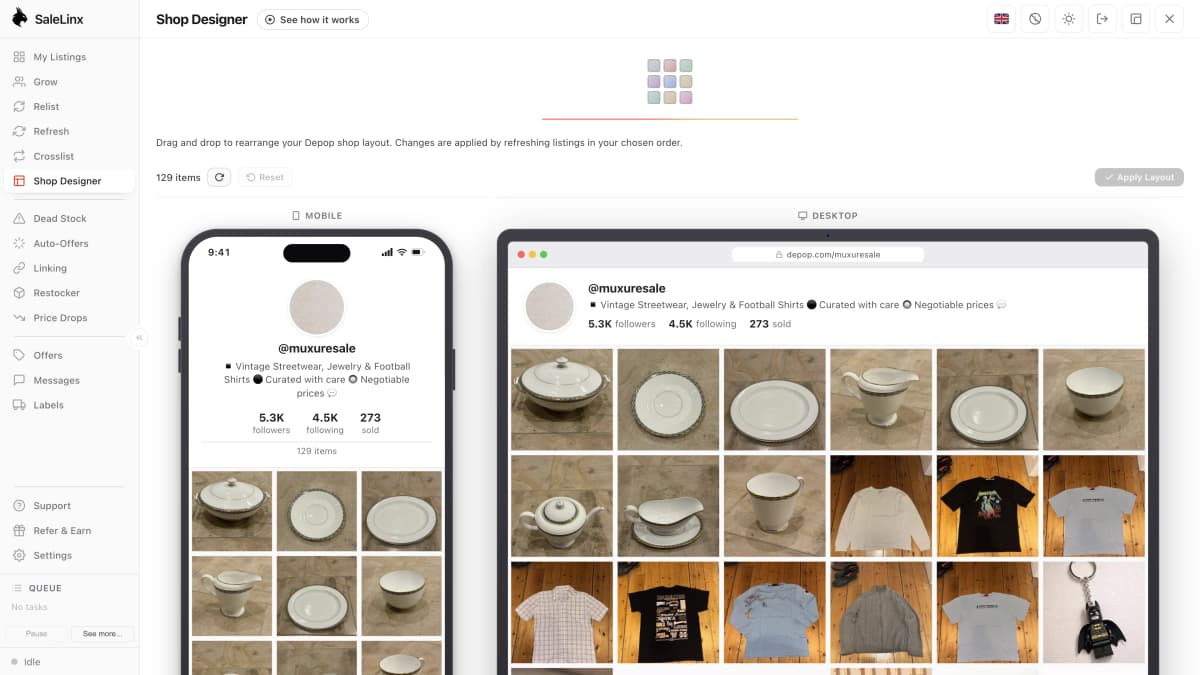
SaleLinx is a Chrome extension for Depop, Vinted and eBay sellers. For the jobs above:
- The Messages and offers view brings Depop, Vinted and eBay offers into one place.
- On a Pro or Business plan, auto-accept offers accepts offers that meet a percentage of your asking price and a minimum price you set.
- The Dead stock view shows items that are not moving, and bulk edit changes titles, descriptions or prices across many listings at once.
- The shop designer lets you drag-reorder your Depop shop layout.
It does not promise views, ranking or sales. SaleLinx is not affiliated with Depop. There is a 14-day free trial.
Try it free for 14 daysQuestions
How do I get more sales on Depop as a beginner?
Start with the listing. Take honest photos from every angle, write a title using words a buyer would search for, add measurements and flaws, and price close to similar sold items. Fill in every field, including brand and colour. Then reply to offers quickly. Depop says these are the biggest levers, and it makes no promise about sales.
Does refreshing my listings help on Depop?
Depop has not said so. Its ranking page says listing date gives newer items only a slight edge, much less than relevance, and its help centre has no page on refreshing. Improving a photo, title or price is a documented way to help a listing, so start there.
Are boosted listings worth it on Depop?
It depends on the item. Boosting costs 12% of the sale price in the UK, charged only if a buyer saw the boosted listing and bought within 28 days. On a £20 item that is £2.40 on top of payment processing. It suits a well-priced item that is not getting views, and it will not fix weak photos or a high price.
What is the best way to price on Depop?
Check what similar items sold for, using Depop’s suggested range and sold examples as a guide. List a little above your lowest acceptable price so you have room for offers, and use Send offer for people who liked the item. Remember the 2.9% plus £0.30 processing fee comes out of what you receive.
Do bundles help sell more on Depop?
They can. Depop lets you offer a percentage off or better shipping when a buyer takes two or more items, and shows a banner on your shop. It is a good fit for low-priced items. Depop does not publish figures on how much bundles raise sales.